
Turn an Afternoon of Uncommitted Work into Clean Commits
You meant to commit after the bug fix. Then you renamed a few things, started on a feature, and let an agent tidy up the tests. Now git status shows fourteen modified files, and the three pieces of work are mixed together, sometimes in the same file.
The Usual Way
git add -p stages hunk by hunk, so you can build each commit by hand. It works when the pieces are in different hunks. When the fix and the rename touch the same lines, you’re editing patches by hand, and the commits you end up with were never on disk together, so they were never built or tested as they are.
The Way Aember Does It
Aember records every edit as it happens, so it knows the order you did things in. Its Git History shows those edits, called moments, between the commits, with your uncommitted moments in a band at the top. You place commit boundaries between moments, and each boundary becomes a commit of the files as they were at that point.
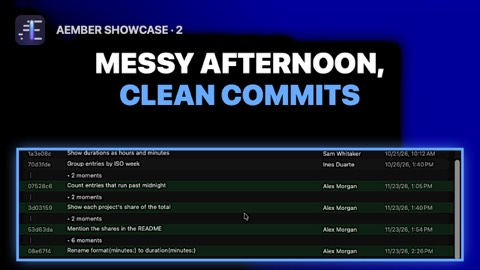
- Choose Git > Commit from History… (⌥⌘K). Git History opens with a boundary after all your uncommitted work and a drafted message.
- Expand the Uncommitted row. Move the pointer between two moments, for example where the bug fix ends and the rename begins, and click to place a boundary there.
- Type each boundary’s message. Its files button leaves files out of that commit if you need to.
- Click a boundary to see the diff of its commit. Drag it to move it; every change to boundaries can be undone.
- Click the Apply button, such as “Apply 3 Commits”. Nothing in git changes until you do, and your working tree is left as it is.
See Commit from History for the details.
Things to Know
- Each commit holds the files exactly as they were at that moment, so it may contain contents that were never saved to disk, and so were never built or tested. Aember says so before it commits, and offers to save first.
- The same boundaries can split an unpushed commit into several. The button then reads, for example, “Split into 3 Commits”.
- An agent’s changes are moments like yours, marked with its name, so a boundary can put an agent’s work in a commit of its own.
- Stash Changes After This… on a moment puts the work after it in a git stash and takes the files back to that moment. See Commit and Stash from Moments.
- This needs a license or the free two-week trial. History records your work either way.